Setting Oracle database to Read-Only
I wanted to keep the users or application from modifying the data in database while taking the backup prior to application upgrade but still have the database running for the report (does only read) to be able to read data.
create or replace directory Datapump as 'G:Datapump';
GRANT READ, WRITE on directory "DATAPUMP" to ORCL ;
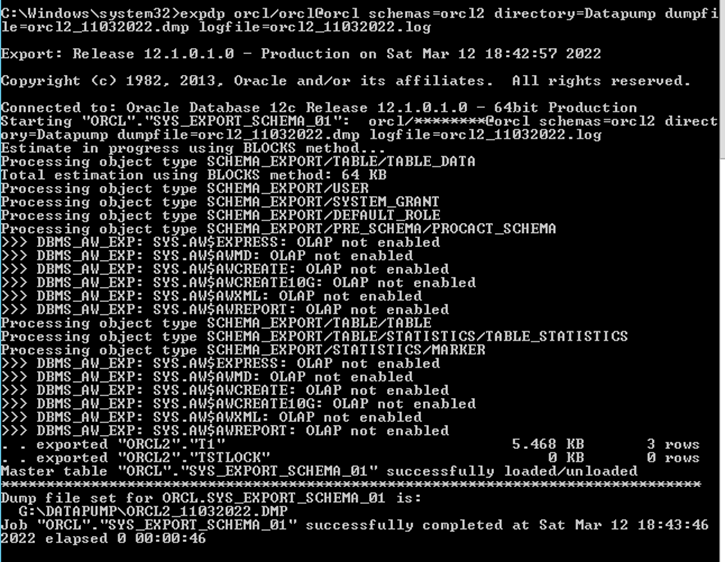
SQL> expdp orcl/orcl@orcl schemas=orcl2 directory=Datapump dumpfile=orcl2_110320
22.dmp logfile=orcl2_11032022.log
Setting Oracle database to Read-Only
- Shut down the database if already running
- Startup mount the database
- Alter database open read only
- Confirm the open mode:
SQL> conn sys/orcl@orcl as sysdba;
Connected.
SQL> shutdown immediate ;
Database closed.
Database dismounted.
ORACLE instance shut down.
SQL> startup mount
SP2-0642: SQL*Plus internal error state 2133, context 3114:0:0
Unsafe to proceed
ORA-03114: not connected to ORACLE
SQL> conn sys/orcl@orcl as sysdba;
ERROR:
ORA-12514: TNS:listener does not currently know of service requested in connect
descriptor
SQL> host
Microsoft Windows [Version 6.3.9600]
(c) 2013 Microsoft Corporation. All rights reserved.
lsnrctl status
LSNRCTL for 64-bit Windows: Version 12.1.0.1.0 - Production on 16-MAR-2022 02:0
:44

Copyright (c) 1991, 2013, Oracle.  All rights reserved.

Connecting to (DESCRIPTION=(ADDRESS=(PROTOCOL=TCP)(HOST=host
(PORT=1521)))
STATUS of the LISTENER
------------------------
Alias                     LISTENER
Version                   TNSLSNR for 64-bit Windows: Version 12.1.0.1.0 - Prod
ction
Start Date                12-MAR-2022 15:10:49
Uptime                    3 days 10 hr. 54 min. 55 sec
Trace Level               off
Security                  ON: Local OS Authentication
SNMP                      OFF
Listener Parameter File   E:oracleproduct12.1.0dbhome_1NETWORKADMINliste
er.ora
Listener Log File         E:oracleproduct12.1.0dbhome_1logdiagtnslsnrGR
KSWDCMACTESTlisteneralertlog.xml
Listening Endpoints Summary...
  (DESCRIPTION=(ADDRESS=(PROTOCOL=tcp)(HOST=host)(PORT=1521)
)
  (DESCRIPTION=(ADDRESS=(PROTOCOL=ipc)(PIPENAME=.pipeEXTPROC1521ipc)))
Services Summary...
Service "CLRExtProc" has 1 instance(s).
  Instance "CLRExtProc", status UNKNOWN, has 1 handler(s) for this service...
Service "other" has 2 instance(s).
  Instance "other", status UNKNOWN, has 1 handler(s) for this service...
  Instance "other", status READY, has 1 handler(s) for this service...
The command completed successfully

Not showing orcl instance despite Oracle services running
C:Windowssystem32>lsnrctl stop
C:Windowssystem32>lsnrctl start
LSNRCTL for 64-bit Windows: Version 12.1.0.1.0 - Production on 16-MAR-2022 02:0
:12

Copyright (c) 1991, 2013, Oracle.  All rights reserved.

Starting tnslsnr: please wait...

TNSLSNR for 64-bit Windows: Version 12.1.0.1.0 - Production
System parameter file is E:oracleproduct12.1.0dbhome_1NETWORKADMINlisten
r.ora
Log messages written to E:oracleproduct12.1.0dbhome_1logdiagtnslsnrhostlisteneralertlog.xml
Listening on: (DESCRIPTION=(ADDRESS=(PROTOCOL=tcp)(HOST=host
(PORT=1521)))
Listening on: (DESCRIPTION=(ADDRESS=(PROTOCOL=ipc)(PIPENAME=.pipeEXTPROC152
ipc)))

Connecting to (DESCRIPTION=(ADDRESS=(PROTOCOL=TCP)(HOST=host
(PORT=1521)))
STATUS of the LISTENER
------------------------
Alias                     LISTENER
Version                   TNSLSNR for 64-bit Windows: Version 12.1.0.1.0 - Prod
ction
Start Date                16-MAR-2022 02:06:17
Uptime                    0 days 0 hr. 0 min. 8 sec
Trace Level               off
Security                  ON: Local OS Authentication
SNMP                      OFF
Listener Parameter File   E:oracleproduct12.1.0dbhome_1NETWORKADMINliste
er.ora
Listener Log File         E:oracleproduct12.1.0dbhome_1logdiagtnslsnrGR
KSWDCMACTESTlisteneralertlog.xml
Listening Endpoints Summary...
  (DESCRIPTION=(ADDRESS=(PROTOCOL=tcp)(HOST=host)(PORT=1521)
)
  (DESCRIPTION=(ADDRESS=(PROTOCOL=ipc)(PIPENAME=.pipeEXTPROC1521ipc)))
Services Summary...
Service "CLRExtProc" has 1 instance(s).
  Instance "CLRExtProc", status UNKNOWN, has 1 handler(s) for this service...
Service "orcl" has 1 instance(s).
  Instance "orcl", status UNKNOWN, has 1 handler(s) for this service...
Service "other" has 1 instance(s).
  Instance "other", status UNKNOWN, has 1 handler(s) for this service...
The command completed successfully
exit
SQL> conn sys/orcl@orcl as sysdba;
Connected to an idle instance.
SQL> startup mount;
ORACLE instance started.
SQL> alter database open read only;

Database altered.
ORACLE instance started.

Total System Global Area 2.0911E+10 bytes
Fixed Size                  2806816 bytes
Variable Size            1.6442E+10 bytes
Database Buffers         4429185024 bytes
Redo Buffers               37625856 bytes
Database mounted.
alter database open read only;
Database altered.
select open_mode from v$database;

OPEN_MODE
--------------------
READ ONLY
C:Windowssystem32>expdp orcl/orcl@orcl schemas=orcl2 directory=Datapump dumpfi
le=orcl2_16032022.dmp logfile=orcl2_16032022.log
Export: Release 12.1.0.1.0 - Production on Wed Mar 16 02:10:21 2022

Copyright (c) 1982, 2013, Oracle and/or its affiliates.  All rights reserved.

Connected to: Oracle Database 12c Release 12.1.0.1.0 - 64bit Production
ORA-31626: job does not exist
ORA-31633: unable to create master table "ORCL.SYS_EXPORT_SCHEMA_05"
ORA-06512: at "SYS.DBMS_SYS_ERROR", line 95
ORA-06512: at "SYS.KUPV$FT", line 1031
ORA-16000: database or pluggable database open for read-only access
In this mode, the database is open and available for queries, but any write operations will be blocked with an error like “ORA-01502: index ‘…’ in unusable state”.
Limitation: Data Pump exports will fail as they require write access to database metadata even though no data is changed.
You can’t expdp a read-only database.
The other option is to enable Restricted session.
Restricted session allows certain designated users to connect and make data changes while keeping all other sessions read-only.
To enable restricted session:
- Shut down and mount the database
- Enable restricted session in ALTER SYSTEM
- Open the database
- Grant
RESTRICTED SESSIONprivilege to users that need read-write access
Any sessions without the restricted session privilege can only perform queries.This mode is useful to allow things like Data Pump exports while keeping the database readonly for other users.
I quickly created a user to test
Created a Role and grant the role access to the objects in ORCL2 schema
CREATE  ROLES readwrite_rol;
SELECT 'GRANT SELECT, INSERT, UPDATE, DELETE ON '||owner||'.'||table_name||' to readwrite_rol;' from dba_tables where owner = 'ORCL2';

GRANT SELECT, INSERT, UPDATE, DELETE ON ORCL2.TSTLOCK to readwrite_rol;
GRANT SELECT, INSERT, UPDATE, DELETE ON ORCL2.T1 to readwrite_rol;

create user testuserCreate identified by orcl;
-- SYSTEM PRIVILEGES
GRANT CREATE SESSION TO "testuserCreate" ;
Second test user
create user testusercreaterestricted identified by orcl;
-- SYSTEM PRIVILEGES
GRANT CREATE SESSION TO "TESTUSERCREATERESTRICTED" ;
GRANT RESTRICTED SESSION TO "TESTUSERCREATERESTRICTED" ;

SQL> shutdown immediate  ;
ORACLE instance shut down.
SQL> startup mount
ORACLE instance started.
SQL> alter database open;

Database altered.
SQL> shutdown immediate;
Database closed.
Database dismounted.
ORACLE instance shut down.
SQL> startup mount;
ORACLE instance started.
SQL> alter system enable restricted session;

SQL> select logins, active_state from v$instance;
Tested the 2 users
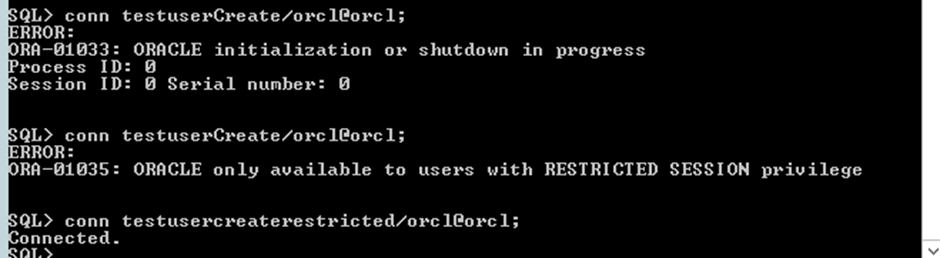
testuserCreate failed with ERROR:
ORA-01035: ORACLE only available to users with RESTRICTED SESSION privilegeGRANT
CREATE SESSION and RESTRICTED SESSION are needed to connect to a Restricted database
Testusercreaterestricted
Connected successfully.
expdp orcl/orcl@orcl schemas=orcl2 directory=Datapump dumpfile=orcl2_16032022.dmp logfile=orcl2_16032022.log
Connected to: Oracle Database 12c Release 12.1.0.1.0 - 64bit Production
Starting "ORCL"."SYS_EXPORT_SCHEMA_01":  orcl/********@orcl schemas=orcl2 direct
ory=Datapump dumpfile=orcl2_16032022.dmp logfile=orcl2_16032022.log
. . exported "ORCL2"."T1"                                5.468 KB       3 rows
. . exported "ORCL2"."TSTLOCK"                               0 KB       0 rows
Master table "ORCL"."SYS_EXPORT_SCHEMA_01" successfully loaded/unloaded
******************************************************************************
Dump file set for ORCL.SYS_EXPORT_SCHEMA_01 is:
  G:DATAPUMPORCL2_16032022.DMP
Job "ORCL"."SYS_EXPORT_SCHEMA_01" successfully completed at Wed Mar 16 14:09:48
2022 elapsed 0 00:00:50
Any user or users granted role or roles below have access to the database in restricted mode.
select a.grantee,a.privilege,a.admin_option,a.common
 FROM DBA_SYS_PRIVS a
 INNER JOIN
 DBA_SYS_PRIVS b
 ON a.grantee=b.grantee
 WHERE a.PRIVILEGE ='CREATE SESSION'
AND
  b.PRIVILEGE='RESTRICTED SESSION';
Any user listed in
SELECT *
  FROM DBA_ROLE_PRIVS  WHERE GRANTED_ROLE IN ('DBA','SYS');
Can access the database in restricted mode.
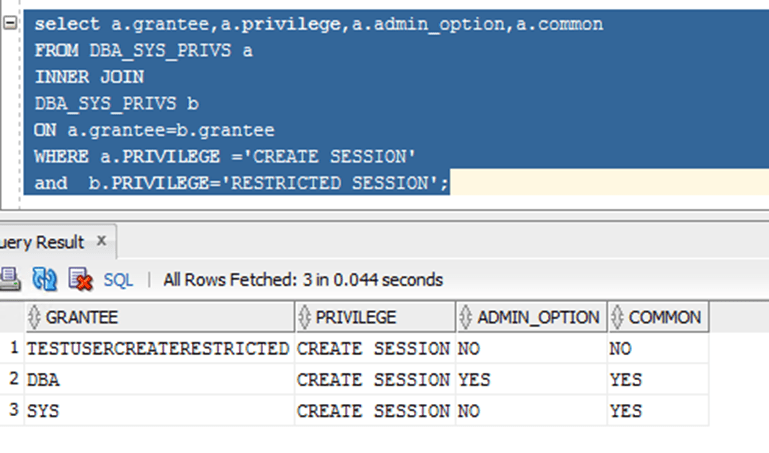
Any user or users granted role or roles above have access to the database in restricted mode.
Who Can Access in Restricted Mode?
The following users have access to an Oracle database in restricted session mode:
- Users explicitly granted
RESTRICTED SESSIONandCREATE SESSIONprivileges - Users granted DBA or SYSDBA roles
- Application users that use the above accounts to connect
By managing these privileges and roles, we can control which users and applications can write to the database in restricted mode.
I hope this gives you a good overview of how to setup an Oracle database in read-only or restricted mode for maintenance activities! Let me know if you have any other questions.