Introduction
Ensuring high availability and disaster recovery across multiple sites is a priority for modern database infrastructures. Distributed Availability Groups (DAGs) in SQL Server 2019 allow organizations to extend high availability solutions across different geographic regions, domains, or data centers. This guide explores the setup of a Distributed Availability Group to enhance data protection and minimize downtime.
Understanding Distributed Availability Groups
Always On Availability Groups (AGs) were first introduced in SQL Server 2012, with Distributed Availability Groups becoming available in SQL Server 2016. DAGs enable seamless replication between multiple Availability Groups, even across different clusters, domains, platforms (Windows/Linux), SQL Server versions, and editions (Standard/Enterprise). A DAG supports up to 18 replicas, with one read/write primary database, while others remain read-only.
Key Features:
- Can span different domains, regions, and data centers.
- Supports cross-platform replication (Windows and Linux).
- Allows mixed SQL Server versions (2017 or later).
- Requires a listener on each AG replica.
Step 1: Preparing the Environment
Prerequisites:
- Windows Server Failover Clustering (WSFC) enabled on all participating nodes.
- SQL Server 2019 installed with the Always On feature enabled.
- Two availability groups (AG1 and AG2) in separate WSFC clusters.
- Appropriate network configuration to support inter-cluster communication.
- Listener endpoints configured for each AG.
| WSFC | CLUSQLWSFC | CLUSQLWSFC2 |
| Primary Server Name | vmWin19B01 | Forwarder – vmWin19BDC00 |
| IP | 152.168.0.7 | 152.168.0.5 |
| Listener | AgList1 | ag2List |
| Secondary Server Name | vmWin19B02 | Win19C03 |
| IP | 152.168.0.9 | 152.168.0.4 |
| AG name | ag1 | ag2 |
Step 2: Configuring Windows Server Failover Clustering
- Set up the OS and enable Failover Clustering Features:Setup the OS, enable the Failover Clustering Features install the SQL Server 2019 .You can get the tips from Setting up the VM and Microsoft Windows Server 2019.Example Clusters:
CLUSSQLWSFC(Primary Cluster)CLUSSQLWSFC2(Secondary Cluster)
- Setup the OS, enable the Failover Clustering Features install the SQL Server 2019 .You can get the tips from Install and Configure SQL Server 2019 Failover Cluster 2.
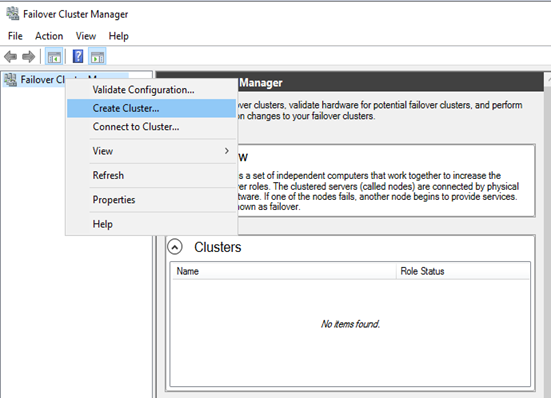
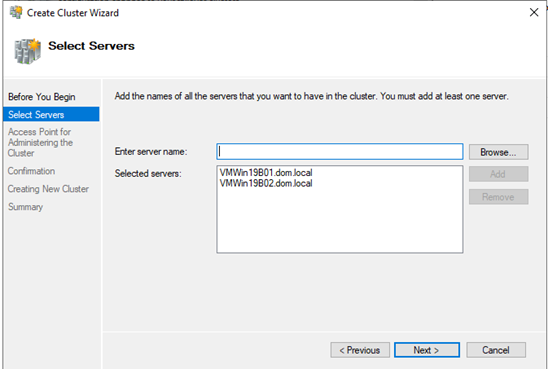
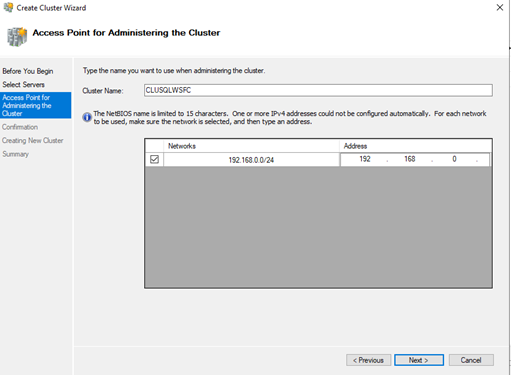
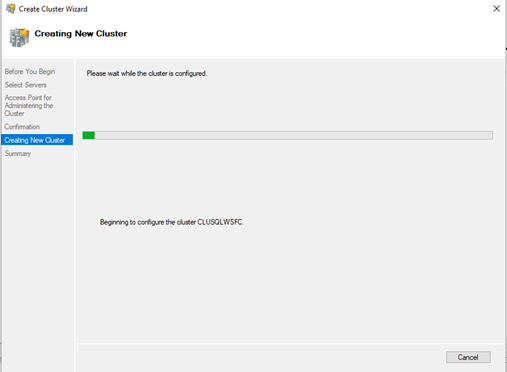
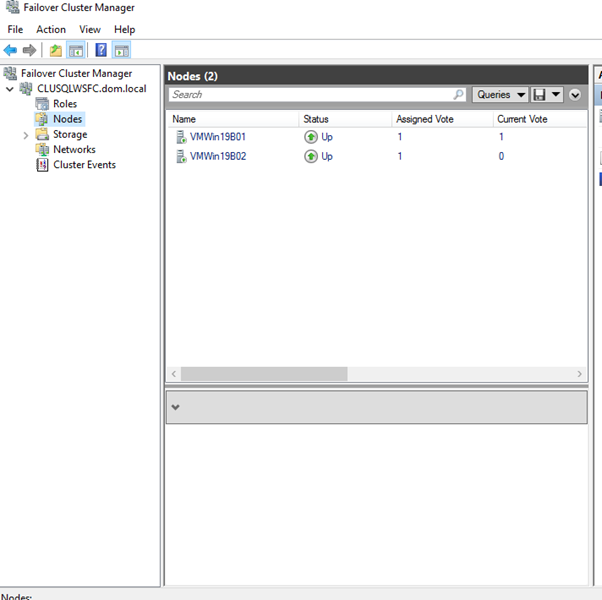
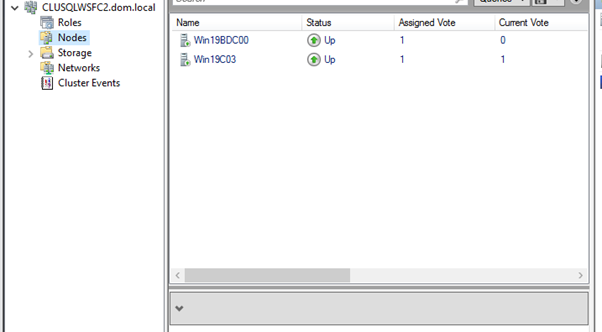
3. Create an Availability Group (AG1) on Primary Cluster:
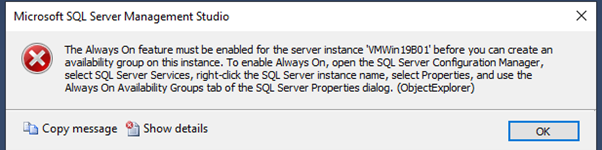
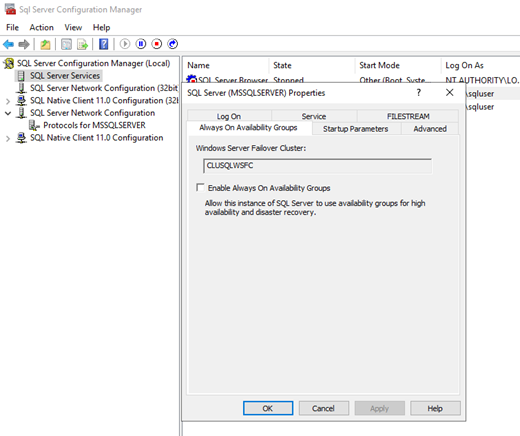
Enable Always On AG in the SQL configuration manager and restart the service on VMWin19B01 and VMWin19B02.
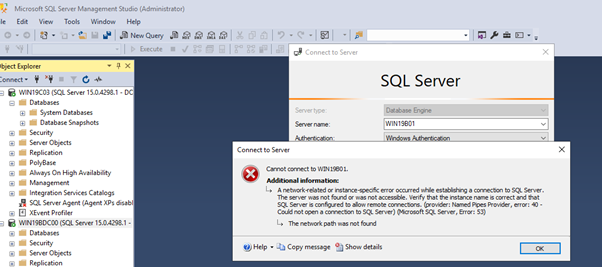
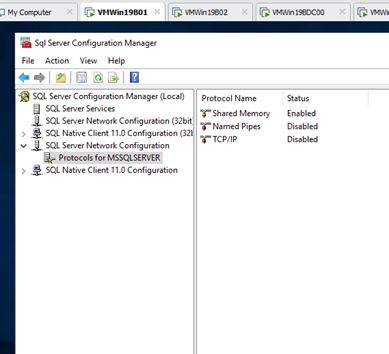
Create a test database in the Primary Server
:connect VMWin19B01
CREATE DATABASE [testDB]
 CONTAINMENT = NONE
 ON PRIMARY
( NAME = N'testDB', FILENAME = N'E:Microsoft SQL ServerDatatestDB.mdf' , SIZE = 51200KB , FILEGROWTH = 102400KB )
 LOG ON
( NAME = N'testDB_log', FILENAME = N'E:Microsoft SQL ServerLogtestDB_log.ldf' , SIZE = 20480KB , FILEGROWTH = 102400KB )
GO

BACKUP DATABASE [testDB] TO DISK ='\WIN19C03Backuptestdb.bak'
BACKUP LOG [testDB] TO DISK ='\WIN19C03Backuptestdb.trn'
Create a a testDB and Restore the backup from the Primary to the Secondary server.
:connect VMWin19B02

CREATE DATABASE [testDB]
 CONTAINMENT = NONE
 ON PRIMARY
( NAME = N'testDB', FILENAME = N'E:Microsoft SQL ServerDatatestDB.mdf' , SIZE = 51200KB , FILEGROWTH = 102400KB )
 LOG ON
( NAME = N'testDB_log', FILENAME = N'E:Microsoft SQL ServerLogtestDB_log.ldf' , SIZE = 20480KB , FILEGROWTH = 102400KB )
GO
:connect VMWin19B02

RESTORE DATABASE [testDB] FROM DISK ='\WIN19C03Backuptestdb.bak' WITH MOVE
 N'testDB' TO  N'E:Microsoft SQL ServerDatatestDB.mdf',
MOVE N'testDB_log' TO N'E:Microsoft SQL ServerLogtestDB_log.ldf',
   STATS = 10, REPLACE, NORECOVERY;
GO
:connect VMWin19B02
RESTORE LOG [testDB] FROM DISK ='\WIN19C03Backuptestdb.trn' WITH STATS=5, NORECOVERY;
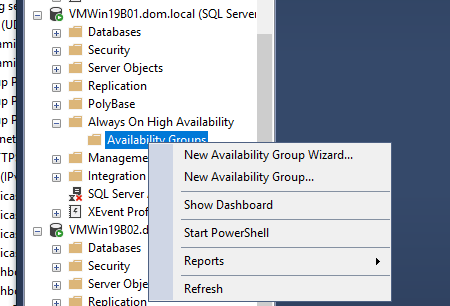
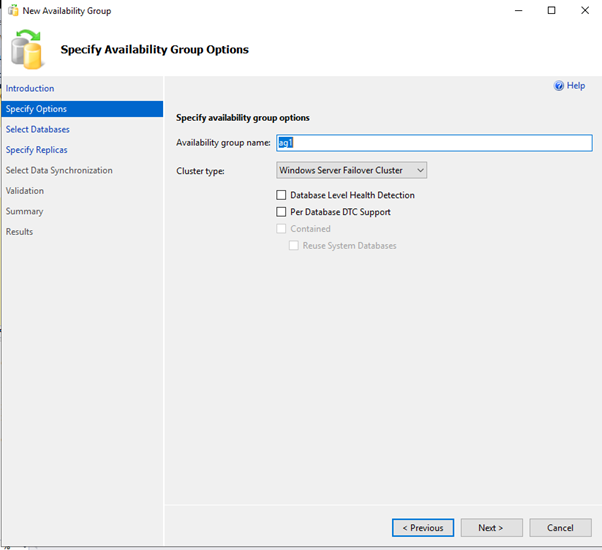
Add New AvailabilityGroup Wizard using GUI
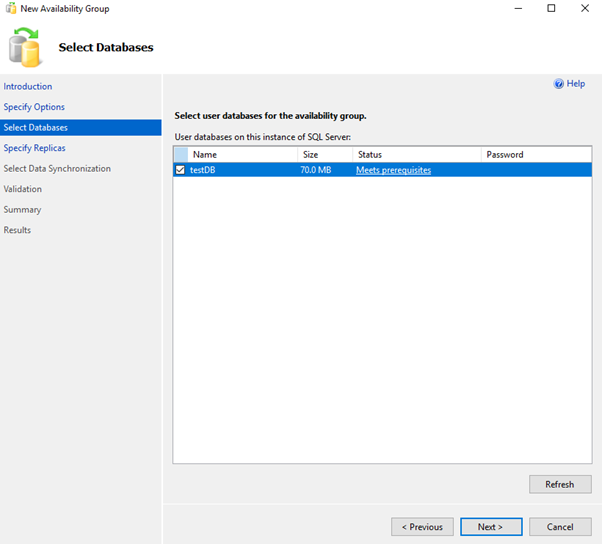
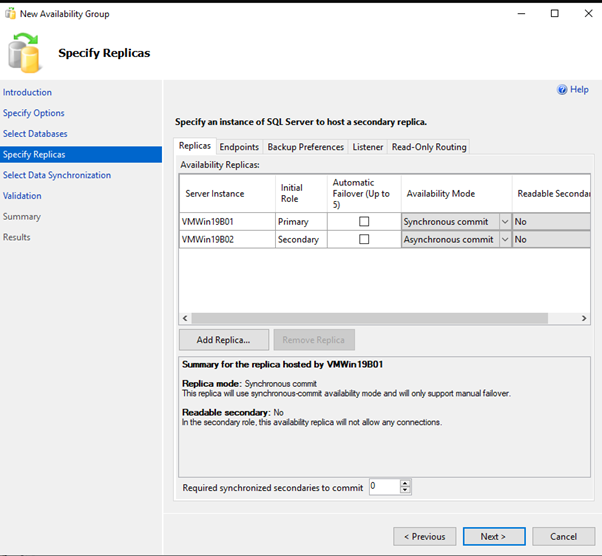
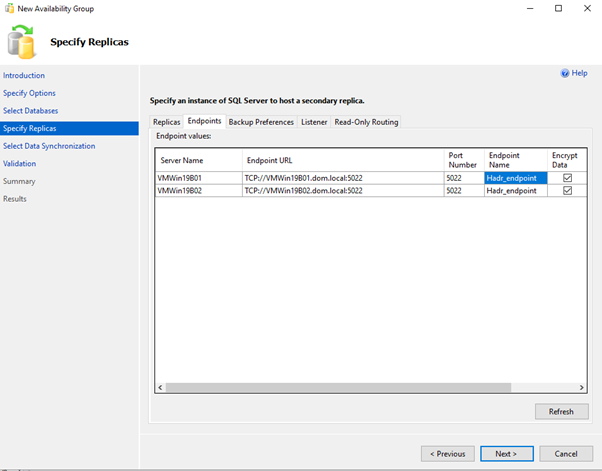
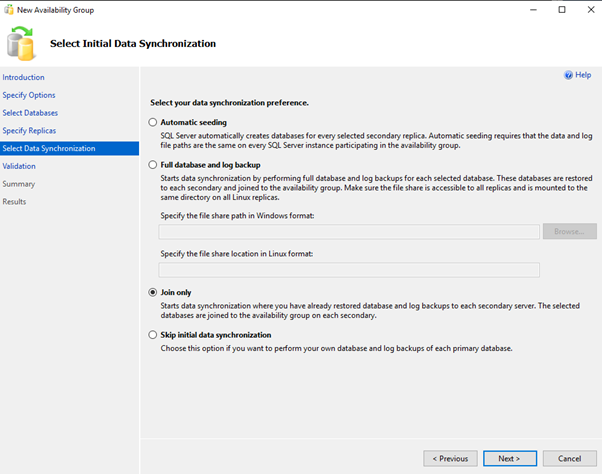
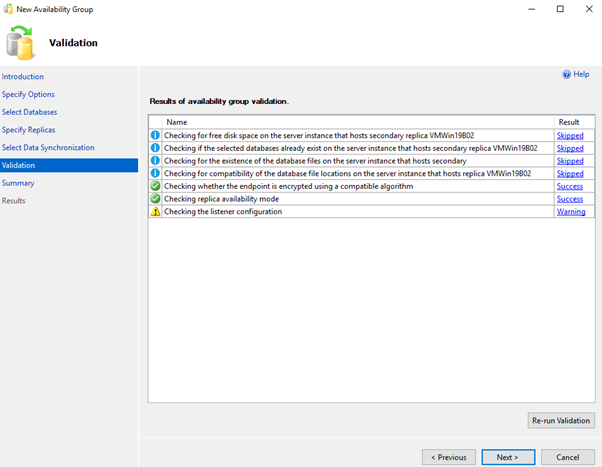
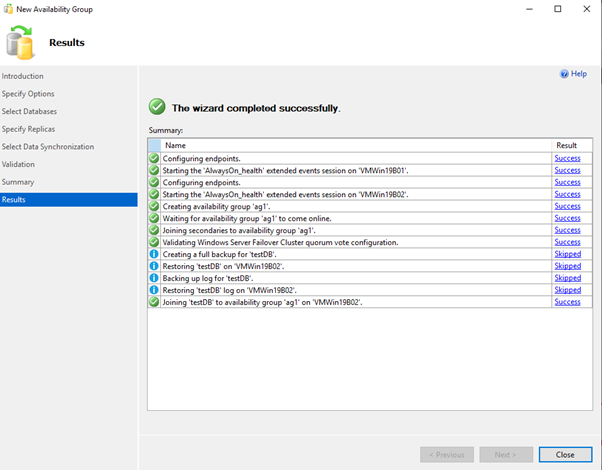
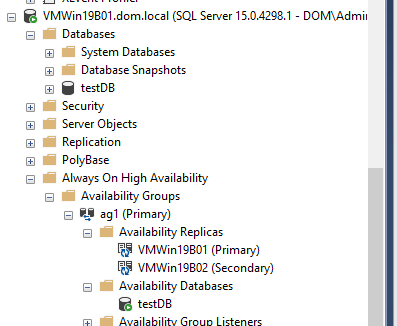
OR
YOU MUST EXECUTE THE FOLLOWING SCRIPT IN SQLCMD MODE.global primary in a distributed availability group. Server1 is the global primary in this example.
:Connect VMWin19B01.dom.local
CREATE AVAILABILITY GROUP [AG1]<br>WITH (AUTOMATED_BACKUP_PREFERENCE = SECONDARY)<br>FOR DATABASE [TestDB]<br>REPLICA ON N'VMWin19B01' WITH (ENDPOINT_URL = N'TCP://VMWin19B01.dom.local:5022',<br>AVAILABILITY_MODE = SYNCHRONOUS_COMMIT, FAILOVER_MODE = MANUAL, SEEDING_MODE = MANUAL),<br>N'VMWin19B02' WITH (ENDPOINT_URL = N'TCP://VMWin19B02.dom.local:5022',<br>AVAILABILITY_MODE = SYNCHRONOUS_COMMIT, FAILOVER_MODE = MANUAL, SEEDING_MODE = MANUAL);<br>GO
4.Join the secondary replica to AG1:
ALTER AVAILABILITY GROUP [AG1] JOIN;
<strong>Alter endpoint to listen to all IP addresses , the script changes a listener endpoint to listen on all IP addresses.</strong>

:Connect VMWin19B01.dom.local

ALTER ENDPOINT [Hadr_endpoint]
   AS TCP (LISTENER_IP = ALL)
GO


:Connect VMWin19B02.dom.local
ALTER ENDPOINT [Hadr_endpoint]
   AS TCP (LISTENER_IP = ALL)

GO


:Connect VMWin19B01.dom.local

USE [master]
GO
ALTER AVAILABILITY GROUP [ag1]
ADD LISTENER N'ag1List' (
WITH IP
((N'152.168.0.10', N'255.255.255.0')
)
, PORT=60173);
GO
5. Repeat the process to create AG2 on Secondary Cluster.
The AG is granted “create databases” on the secondary.TO allow AG to create database and kick the seeding automatically from Primary.
:Connect VMWin19B02.dom.local
ALTER AVAILABILITY GROUP [ag1] GRANT CREATE ANY DATABASE
GO
The AG is granted “create databases” on the secondary.TO allow AG to create database and kick the seeding automatically from Primary.
:Connect VMWin19B02.dom.local
ALTER AVAILABILITY GROUP [ag1] GRANT CREATE ANY DATABASE
GO
<strong>Create Listener in the Forwarder Servers on WSFC CLUSQLWSFC2</strong>

:Connect Win19BDC00.dom.local

USE [master]
GO
ALTER AVAILABILITY GROUP [ag2]
ADD LISTENER N'ag2List' (
WITH IP
((N'152.168.0.11', N'255.255.255.0')
)
, PORT=60173);
GO
<strong>Connect to the Secondary Replica on Servers on WSFC CLUSQLWSFC2 </strong>Create Endpoint

:Connect WIN19C03.dom.local
CREATE ENDPOINT [Hadr_endpoint]
   STATE=STARTED
   AS TCP (LISTENER_PORT = 5022, LISTENER_IP = ALL)
FOR DATA_MIRRORING (
  ROLE = ALL,
  AUTHENTICATION = WINDOWS NEGOTIATE,
  ENCRYPTION = REQUIRED ALGORITHM AES
)
GO
<strong>Join the secondary replicas to the primary availability group</strong>
:Connect WIN19C03.dom.local

ALTER AVAILABILITY GROUP [ag2] JOIN
ALTER AVAILABILITY GROUP [ag2] GRANT CREATE ANY DATABASE
GO
Step 4: Configuring the Distributed Availability Group
Create the DAG from the primary AG:
---WSFC CLUSQLWSFC

:Connect vmWin19B01.dom.local


CREATE AVAILABILITY GROUP [distributedag1ag2]
  WITH (DISTRIBUTED)
  AVAILABILITY GROUP ON
     'ag1' WITH
     (
         LISTENER_URL = 'tcp://ag1List.dom.local:5022',
         AVAILABILITY_MODE = ASYNCHRONOUS_COMMIT,
         FAILOVER_MODE = MANUAL,
         SEEDING_MODE = MANUAL
     ),
     'ag2' WITH
     (
         LISTENER_URL = 'tcp://ag2List.dom.local:5022',
         AVAILABILITY_MODE = ASYNCHRONOUS_COMMIT,
         FAILOVER_MODE = MANUAL,
         SEEDING_MODE = MANUAL
     );
GO
Primary Forwarder
:Connect Win19BDC00.dom.local
ALTER AVAILABILITY GROUP [distributedag1ag2]
  JOIN
  AVAILABILITY GROUP ON
     'ag1' WITH
     (
         LISTENER_URL = 'tcp://ag1List.dom.local:5022',
         AVAILABILITY_MODE = ASYNCHRONOUS_COMMIT,
         FAILOVER_MODE = MANUAL,
         SEEDING_MODE = MANUAL
     ),
     'ag2' WITH
     (
         LISTENER_URL = 'tcp://ag2List.dom.local:5022',
         AVAILABILITY_MODE = ASYNCHRONOUS_COMMIT,
         FAILOVER_MODE = MANUAL,
         SEEDING_MODE = MANUAL
     );
GO
ALTER DATABASE [TestDB] SET HADR AVAILABILITY GROUP = [distributedag1ag2]
Secondary Replica
:Connect WIN19C03.dom.local

ALTER DATABASE [TestDB] SET HADR AVAILABILITY GROUP = [ag2]
Step 6: Performing Failover Testing
Before putting the Distributed AG into production, failover testing is crucial.
- Monitor synchronization health:
SELECT ag.name AS [AG Name],
       ar.replica_server_name AS [Replica],
       drs.synchronization_state_desc AS [Sync Status]
FROM sys.availability_groups ag
JOIN sys.availability_replicas ar ON ag.group_id = ar.group_id
JOIN sys.dm_hadr_database_replica_states drs ON drs.replica_id = ar.replica_id;
GO
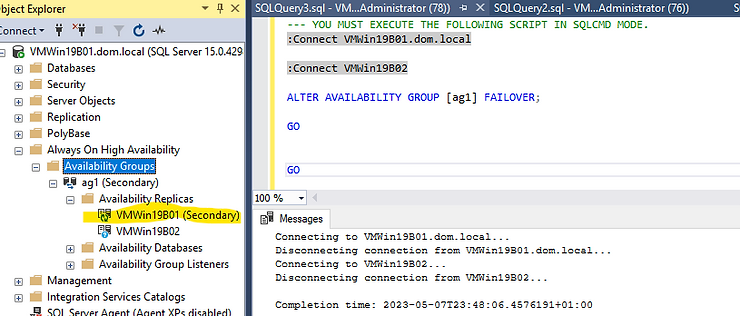
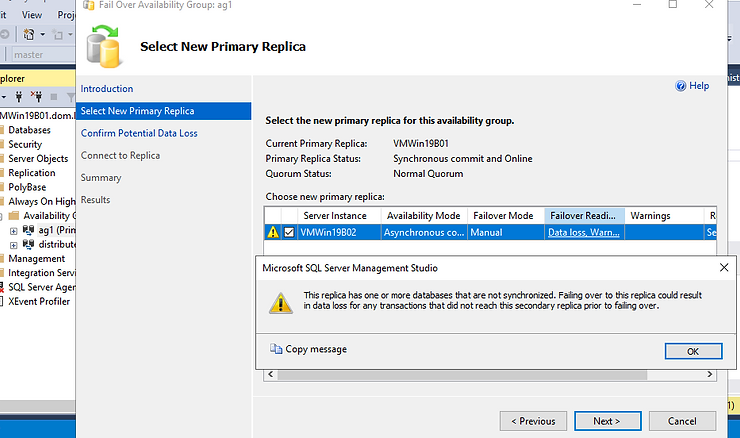
2. Initiate a manual failover:
ALTER AVAILABILITY GROUP [AG1] FAILOVER;
GO
OR
3. Ensure DAG synchronization before finalizing failover:
ALTER AVAILABILITY GROUP [DistributedAG1] MODIFY AVAILABILITY GROUP ON 'AG1'
WITH (AVAILABILITY_MODE = SYNCHRONOUS_COMMIT);
GO
Failover the Primary forwarder to the Secondary replica on CLUSQLWSFC2,Ag2, is similar to the above.
In an emergency where data loss is acceptable, you can trigger a failover without verifying data synchronization by executing:
ALTER AVAILABILITY GROUP [distributedag1ag2] FORCE_FAILOVER_ALLOW_DATA_LOSS;
Failover to the Secondary Cluster AG in a Distributed SQL Server Always On Availability Group to avoid Data loss.
Before taking the leap.
Stop all transactions on the global primary databases.
DAG must be set to Synchronous commit
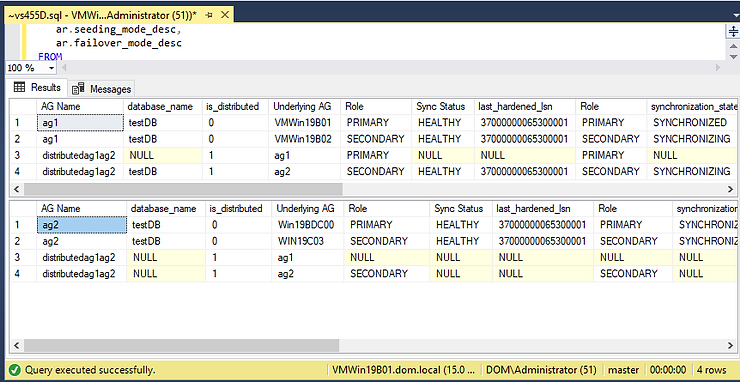
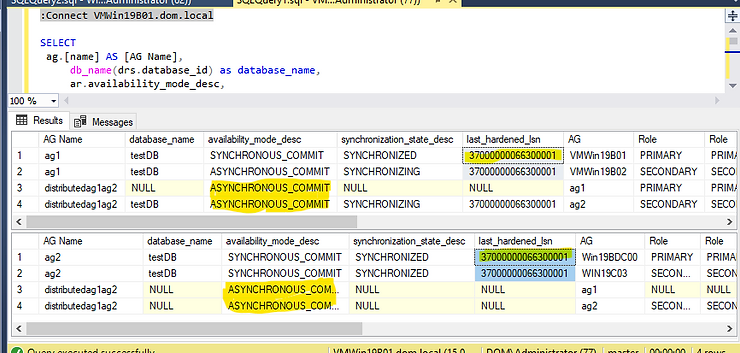
The Distributed AG must be Synchronous. Ensure that the DAG is SYNCHRONIZED. The LAST_HARDENED_LSN must be the same on the primary and forwarder.
Run this on the Primary and the Primary forwarder
-- shows underlying performance of distributed AG (log_send_queue_size,
  -- drs.redo_queue_size) , last_hardened_lsn
SELECT
 ag.[name] AS [AG Name],
     db_name(drs.database_id) as database_name,
   ag.is_distributed,
   ar.replica_server_name AS [AG],
   ars.role_desc AS [Role],
   drs.synchronization_health_desc AS [Sync Desc],
    drs.last_hardened_lsn,
   ars.role_desc AS [Role],
    drs.synchronization_state_desc,
                ar.availability_mode_desc,
   drs.log_send_queue_size,
   drs.redo_queue_size,
   drs.redo_rate,
    drs.log_send_rate,
   ar.endpoint_url,
   ar.seeding_mode_desc,
   ar.failover_mode_desc
FROM

sys.availability_groups ag
  left outer join sys.availability_replicas ar
 on ag.group_id=ar.group_id
 left outer join sys.dm_hadr_availability_replica_states ars
 on ars.replica_id=ar.replica_id
 left outer join sys.dm_hadr_database_replica_states as drs
  on drs.replica_id=ar.replica_id
 GO
The LAST_HARDENED_LSN is the same in the Primary replica and the forwarder. However, the DAG is in ASYNCHRONOUS_COMIT mode. Failing over in this mode will cause a data loss.
Below TSQL script set the Distributed availability group to synchronous mode. Do this to both the Primary and the Primary forwarder.
-- sets the distributed availability group to synchronous commit on both Primary and Forwarder
 ALTER AVAILABILITY GROUP [distributedag1ag2]
 MODIFY
 AVAILABILITY GROUP ON
 'ag1' WITH
  (
  AVAILABILITY_MODE = SYNCHRONOUS_COMMIT
  ),
  'ag2' WITH
  (
  AVAILABILITY_MODE = SYNCHRONOUS_COMMIT
  );
On the global primary set the DAG to Secondary
ALTER AVAILABILITY GROUP distributedag1ag2 SET (ROLE = SECONDARY);
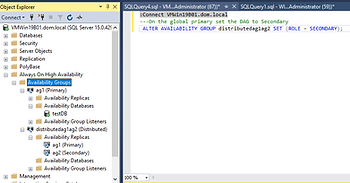
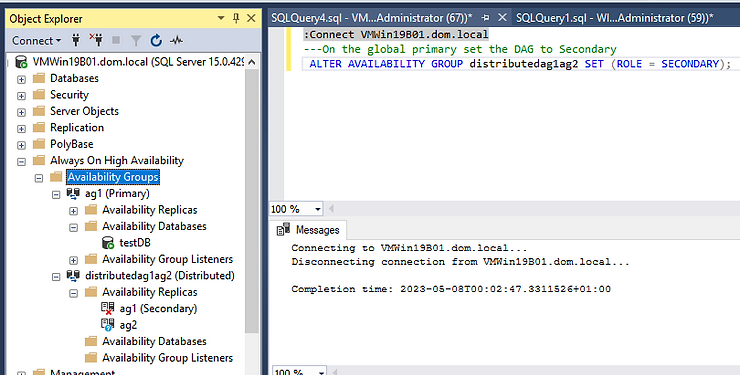
---If the Last_Hardened_lsn is different fail back to global primary to avoid data loss by running this on the global primary

 ALTER AVAILABILITY GROUP distributedag1ag2 FORCE_FAILOVER_ALLOW_DATA_LOSS;
— Once the last_hardened_lsn is the same per database on both sides
— We can Fail over from the primary availability group to the secondary availability group.
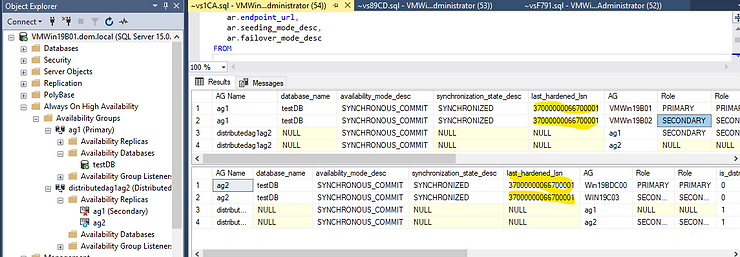
— Run the following command on the forwarder, the SQL Server instance that hosts the primary replica of the secondary availability group.
ALTER AVAILABILITY GROUP distributedag1ag2 FORCE_FAILOVER_ALLOW_DATA_LOSS;
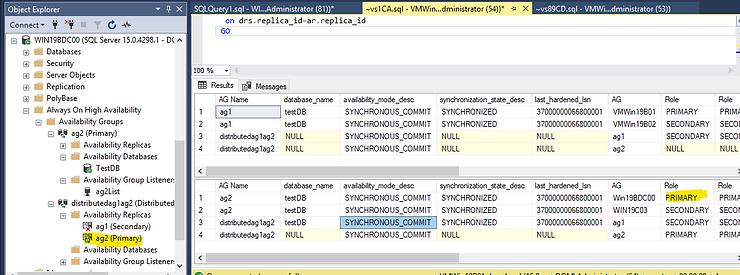
sets the distributed availability group to asynchronous commit on both
In 2022 and later you can set REQUIRED_SYNCHRONIZED_SECONDARIES_TO_COMMIT to 1,to avoid data loss.
Summary: A Resilient SQL Server Deployment
By implementing a Distributed Availability Group, organizations can enhance SQL Server resilience across multiple sites. In this guide, we:
- Set up Windows Server Failover Clustering.
- Created two Always On Availability Groups (AG1 & AG2).
- Established a Distributed Availability Group to connect them.
- Configured a Listener for seamless client connectivity.
- Tested failover scenarios for disaster recovery readiness.
Next Steps
In our upcoming guide, we’ll explore advanced performance tuning for Distributed Availability Groups, ensuring optimal synchronization speeds and minimal latency. Stay tuned!